NOTE: Drafted with AI assistance based on a coding session; edited by me.
If you have ever looked at a file manager and seen 1.4 GB, or at a chat app and seen 2 days ago, you have used a human formatter, even if you did not know the name. Java has no small, simple library for this, so I decided to build my own from scratch. This post walks you through how it works and which problems show up when you turn a number into a sentence, which is not as simple as it sounds.
You can find the full source code here: human-formatter-library on GitHub
I will not paste the whole codebase in this post. Instead, I want to show you the ideas behind it, with small snippets you can try yourself.
What Even Is a Human Formatter
Computers store a file size as a plain count of bytes, like 1503238553. Nobody wants to read that. The library has four static methods that turn raw values into readable text:
- Bytes:
1_500_000_000becomes1.5 GB. - Durations:
11_565seconds becomes3h 12m 45s. - Relative times: a moment two days before now becomes
2 days ago. - Compact numbers:
1_500becomes1.5K.
My first idea also included parsing in the other direction, turning "1.5 GB" back into a number. I will come back to that, because it did not survive.
Step One: How Big Is a Kilobyte
The simplest piece is bytes. A bigger unit is just a name for a pile of bytes, so to format a number you keep asking "can I make a bigger pile?". Take 2,500 bytes: one pile of 1,000 fits, so it is 2.5 KB.
But how big is a pile? Two systems exist:
- Decimal: 1 KB = 1,000 bytes.
- Binary: 1 KiB = 1,024 bytes.
Same input, different output:
1,503,238,553 bytes
decimal: 1.5 GB
binary:  1.4 GiB
My original example in the idea was 1.4 GB, which is the binary math with the decimal label. That is what Windows does, and it is confusing. I picked decimal, so a kilobyte is 1,000 bytes and the units are B, KB, MB, GB, TB, PB and EB. EB is the last one, because a long tops out at about 9.2 EB.

The method checks the biggest unit first and works down:
for (int i = units.length - 1; i >= 0; i--) {
    double unit = _byte / Math.pow(1000, i + 1);
    if (unit >= 1) {
        return "%.1f %s".formatted(Math.floor(unit * 10) / 10, units[i]);
    }
}
My first version started the loop at units.length, one past the last index. It never crashed, but only by coincidence: the divisor on that first pass is so large that the result is always below 1, so units[i] was never reached. A loop should be correct by its own bounds, so I changed it to units.length - 1.
Step Two: Rounding Is a Trap
I used %.1f to show one decimal. Then I tried 999_999 bytes and got:
1000.0 KB
999_999 / 1000 is 999.999, and %.1f rounds it up to 1000.0. But 1,000 KB is already 1 MB, so the unit and the number disagree. The unit was chosen using the value before rounding, and the text was built from the value after rounding.
I could have rounded first and then picked the unit, but I decided to truncate instead: cut the extra digits, never round. Then 999_999 is 999.9 KB, and a value below 1,000 can never display as 1000.0. Java has no "cut to one decimal" format, so the trick is to move the decimal point, cut, and move it back:
Math.floor(999.999 * 10) / 10 // 9999.99 -> 9999 -> 999.9
Step Three: One Value With No Twin
I wanted negative sizes to work, like -5000 becoming -5.0 KB. The plan was to remember the sign, make the number positive, work as usual and put the sign back. That plan has a trap. A long holds one more negative value than positive:
Long.MAX_VALUE =  9_223_372_036_854_775_807
Long.MIN_VALUE = -9_223_372_036_854_775_808
So Math.abs(Long.MIN_VALUE) has no positive twin. Java does not throw. It wraps around and returns Long.MIN_VALUE itself, still negative, so my "make it positive" step silently did nothing. I decided to reject that one value with my own exception, before any sign handling:
if (Long.MIN_VALUE == _byte) {
    throw new HumanFormatterInputException("...");
}
The exception extends IllegalArgumentException, so it is unchecked and nobody is forced into a try/catch for bad input. The loop's last line, which used to be return null just to satisfy the compiler, now throws an IllegalStateException. If the impossible ever happens, it fails loudly instead of returning null.
Step Four: The Parser That Taught Me the Most (and Got Deleted)
Parsing "2.5 KB" back to 2500 looked easy: split on the space, parse the number, multiply by the unit. I wrote it and it returned wrong answers without any error:
"1.5 GB"returned1, because I had forgotten theGBcase in myswitch, so nothing matched and the number came back unmultiplied."5 XB"returned5for the same reason: an unknown unit fell through silently.- A typo in my multiplier,
Math.pow(100, ...)instead of1000, made every step 100 times too small. "NaN KB"returned0, because Java's cast fromdoubletolongturnsNaNinto0.
A wrong answer with no error is worse than a crash, so I made parse throw for a wrong shape, a bad number, an unknown unit and NaN or Infinity. Then I tried "10 EB" and "1000 EB" and got the same number back, 9223372036854775807. A cast from double to long clamps to the biggest long instead of failing.
The check I wrote, _bytes > Long.MAX_VALUE, turned out to be subtly wrong, and this was the part I understood least. A double keeps about 16 digits exactly, and Long.MAX_VALUE has 19. I ran this:
System.out.println((double) Long.MAX_VALUE == Long.MAX_VALUE + 1.0); // true
Converting Long.MAX_VALUE to a double rounds it up to 9,223,372,036,854,775,808, and adding 1.0 changes nothing at that size. Both sides become the same double. The fix was to compare against that exact value with >=. Even "9.2 EB" came back as 9,199,999,999,999,998,976, because 9.2 itself cannot be stored exactly in binary. That is close enough for a human-readable format, and format still printed 9.2 EB for it.
Then I stopped and asked why I was doing this at all. The library is called human-readable, not computer-readable. Parsing doubled the failure paths of every formatter, and anyone who needs it can write it themselves. I deleted the parser and made v1 format-only. I kept what it taught me: silent wrong answers are the real enemy, and checks have to run in the right order.
Step Five: Durations and a Clever Idea That Broke
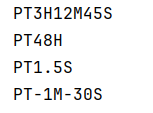
For 3h 12m 45s, my first idea was to let Java do the work. Duration.toString() gives PT3H12M45S, so I cut the first two characters, lowercased the letters and added spaces. It worked for the first example I tried. Then I printed toString() for a few other durations:
Duration.ofSeconds(11_565)  ->  PT3H12M45S
Duration.ofDays(2)          ->  PT48H
Duration.ofMillis(1500)     ->  PT1.5S
Duration.ofSeconds(-90)     ->  PT-1M-30S
Days never appear, so 2d was impossible. The . and the - are not digits, so my loop put spaces after them. I was reshaping a string whose format I did not control. So I went back to arithmetic, and first I did it on paper with 11,565 seconds:
11_565 / 3_600 = 3 hours     11_565 % 3_600 = 765
   765 /    60 = 12 minutes      765 %    60 = 45 seconds
/ gives how many whole units fit, and % gives what is left over. The leftover feeds the next unit. I only print non-zero parts, and a zero duration prints 0s. My first version printed 1h with a trailing space. It was invisible in the console, and I only noticed because the AI asked me to print result.length(): 3 characters instead of 2. A trim() at the end fixed it.
The last bug in this class is my favorite. Duration.ofMillis(-1500).getSeconds() returns -2, not -1. Duration stores -1.5 seconds as -2 whole seconds plus 0.5 seconds. So 1.5s printed 1s while -1.5s printed -2s. I fixed it by flipping the sign of the whole duration first and reading the seconds after:
boolean isNegative = duration.isNegative();
long seconds = duration.abs().getSeconds();   // 1.5s -> 1
The Long.MIN_VALUE check still has to run before abs(), because abs() on that value throws an ArithmeticException instead of my exception.
Step Six: Relative Times
"2 days ago" depends on what "now" is. I could have read the clock inside the method, but then the output changes every second and nothing is repeatable. So the method takes both moments:
RelativeTimeFormatter.format(then, now);
I even tripped over this myself. I tested with Instant.now().plus(1, ChronoUnit.SECONDS) and Instant.now() as two separate calls, and the two clock reads differ by a tiny amount, so the difference was never exactly one second. Capturing one now and reusing it fixed the test.
The same -1.5 bug came back here, and the same fix worked: remember the sign, take the absolute value, truncate. The sign decides between ago and in. A difference under one second prints just now.
Only the largest unit is shown. Each unit is calculated from the one below, and later blocks overwrite earlier ones:
long minute = second / 60;
if (minute > 0 && minute < 60) { unit = "minute"; amount = minute; }

long hour = minute / 60;
if (hour > 0 && hour < 24) { unit = "hour"; amount = hour; }
For 3,600 seconds, the minute block sets 60 minutes and the hour block then overwrites it with 1 hour. The order of the blocks is the rule.
Two bugs here. My first conditions used minute > 1, so exactly 60 seconds printed 60 seconds ago instead of 1 minute ago, because 1 > 1 is false. And when I tried 400 days, I got 34560000 seconds ago. My day block had day < 365, so for 400 days all three blocks were skipped and the defaults stayed. Months and years were out of scope, so the answer was to remove the upper bound and keep counting in days: 400 days ago. A bug I wrote myself and found by tracing the code on paper: seconds + phrase(amount, unit) instead of phrase(...) + " ago" would have printed 3030 seconds, because the number was added in twice.
Compact numbers (1.2K, 3.4M, with K, M, B and T) use the same ideas as bytes. Long.MAX_VALUE prints 9223372.0T. That looks odd, but it is a correct value, and nothing fails silently, so I kept it.
Step Seven: Tests That Prove Something
I used JUnit 5 and pinned the Surefire plugin, because older default versions of Maven's test runner can silently skip JUnit 5 tests. I named tests as sentences, one behavior each, like formatTruncatesNegativeValues.
Two of my tests were weaker than they looked. The first was the truncation test. I used 999_900_000_000_000, which is exactly 999.9 TB, so rounding and truncating give the same text and the test can never fail. A real truncation test needs an input where the two differ, so I changed it to 999_955_000_000_000. Then I checked it with a mutation: I temporarily swapped Math.floor for Math.rint, which rounds, and ran the tests:
Expected :999.9 TB
Actual   :1000.0 TB
Red, as it should be. The second was my exception test, which used IllegalArgumentException.class. That would also pass if some other piece of code threw a different subclass. I changed it to expect my own exception.
One more thing I changed along the way, and not for the better at first: I changed ByteFormatter to print 999.0 B so that my own test would pass, instead of keeping the decision I had made, 999 B. After thinking it over, I kept the new version on purpose. Every output has one decimal, so every output has the same shape.
Step Eight: Shipping It
Before the release, I decided which classes a user should ever touch: the four formatters and the exception. Everything else is hidden, and every public method is a promise. So phrase became private, I renamed InvalidInputException to HumanFormatterInputException, so a stack trace says where it came from, and I deleted a leftover Main class that would have shipped inside the jar. Then I wrote Javadoc for the behavior nobody can guess from a signature: truncation, decimal units and the exception.
Full source, tests, and the README with usage examples live here: github.com/KonstantineVashalomidze/human-formatter-library