NOTE: Drafted with AI assistance based on a coding session; edited by me.
If you have ever printed a red error message from a command line tool, you have used ANSI escape codes, even if you did not know the name. Java does not have anything built in for styling terminal text. So I decided to build my own small library from scratch, and I learned a lot along the way. This post walks you through how it works and what problems you run into when you try to color a few characters, which is not as simple as it sounds.
You can find the full source code here: ansi-styling-library on GitHub
I will not paste the whole codebase in this post. Instead, I want to show you the ideas behind it, with small snippets you can try yourself.
What Even Is an ANSI Escape Code
A terminal does not have a separate channel for color. Everything travels in one stream of text, so styling is done by injecting invisible characters into that stream. Each sequence starts with the ESC character (byte 27), followed by [, some numbers separated by semicolons, and the letter m.
You can try it right now in a terminal:
printf "\033[31mError\033[0m\n"
31 means red text and 0 means reset everything back to normal. These are the codes I used:
1  bold              30-37  text colors
3  italic            40-47  background colors
4  underline         0      reset
9  strikethrough
The colors always follow the same order: black, red, green, yellow, blue, magenta, cyan, white. So red is 30 + 1, and a blue background is 40 + 4. Sounds simple, right? It gets more interesting once you start combining styles, nesting them, and sending the output somewhere that is not a terminal.
Step One: One Immutable Style
The core of the library is a small Style class. It holds a foreground color, a background color, and four on/off attributes. Once a Style is created, nothing in it can change, which makes it safe to pass around. Its one job is to turn whatever is set into an escape code.
First, the colors. Each one is an enum value that remembers its own position in that black to white order:
public enum Color {
    BLACK(0), RED(1), GREEN(2), YELLOW(3),
    BLUE(4), MAGENTA(5), CYAN(6), WHITE(7);
    // ...
}
Then the method that builds the code:
List<String> codes = new ArrayList<>();
if (foregroundColor != null) codes.add(30 + foregroundColor.getAssociation() + "");
if (backgroundColor != null) codes.add(40 + backgroundColor.getAssociation() + "");
if (bold) codes.add("1");
// ... italic, underline, strikethrough

if (codes.isEmpty()) return "";
return "\033[" + String.join(";", codes) + "m";
getAssociation() just returns that position number. Because each color stores it, I did not need a second lookup table for backgrounds. The same number works for both, I only change the base from 30 to 40.
Notice the empty case. My first version returned \033[m when nothing was set, which is a broken sequence. The fix was to return an empty string, because "nothing is set" should mean "do not touch anything", not an error and not a reset.
I also made a mistake that is easy to miss. I had the codes list as a field of the class instead of a local variable, so the second call to the method still contained the codes from the first call. Moving the list inside the method fixed it. Bugs like this only show up when you call the same method twice.
Step Two: A Clean Public API
A style class on its own is not very fun to use. You want something like this:
Ansi.foreground(Style.Color.WHITE)
    .background(Style.Color.RED)
    .bold()
    .apply("Critical");
This is a fluent API. Ansi is only a static entry point, and each of its methods returns an AnsiText. AnsiText collects your choices, and every method on it sets one option and returns itself, so you can keep chaining. apply is the one method that does the real work: it builds the Style, gets the escape code, and wraps your text with it and a reset code at the end.
I split it into two classes on purpose. At first I put the static bold() and the chained bold() in the same class, and the code did not compile, because Java does not allow a static method and an instance method with the same name and parameters in one class. A separate entry point class was the clean way out.
I also decided what users should see. Only Ansi, AnsiText, Box, the exception, and the color enum are public. Everything else is package private, which means it has no access modifier at all, so only classes in the same package can use it. Every public method is a promise you have to keep supporting, so I only promised what a user actually needs.
Step Three: The Nesting Problem
This one surprised me the most. Try this in a terminal:
printf "\033[1mbold \033[31mred\033[0m still bold?\033[0m\n"

The words after red are not bold anymore. The reset code does not mean "undo the last style", it means "wipe everything". So when one styled string sits inside another, the inner reset destroys the outer style.
In the library this happens when you pass the result of one apply call into another. By the time the outer style is applied, the inner string is already flat text with escape codes mixed in. There is no structure left to repair. You could try a narrower reset like 39, which resets only the text color, but it goes back to the default color, not to whatever the outer style was.
A real fix needs the library to keep your styled pieces as a tree and render them together, or to pass the outer style down into the inner call. Both would make the public API much heavier for a small library. So I made a decision: nesting is not supported. If the text already contains an escape code, the library throws an exception instead of quietly producing broken output. To mix styles in one line, you concatenate separately styled pieces:
foreground(RED).apply("Error: ") + foreground(YELLOW).apply("disk full")
None of this is a hidden bug, it is a documented limitation, and I think that is a better deal than pretending the problem does not exist.
Step Four: When Should Color Be Off
If your program writes into a file, or its output goes through a pipe like myTool | less, escape codes turn into garbage characters. So the library has to decide whether color makes sense, and there are three signals:
NO_COLOR: if this environment variable is set, no color. This is a common convention, so users who already set it get it for free.FORCE_COLOR: if this is set, color is on no matter what.- Neither one: check whether output goes to a real terminal with
System.console().
What if both variables are set? I asked myself what goes wrong in each direction. If NO_COLOR wins, someone gets plain text when they wanted color, which is a little ugly. If FORCE_COLOR wins, someone who explicitly said no color gets escape codes in a script that may parse the output, and that can actually break something. So NO_COLOR wins.
Then I ran into the real surprise. I tested System.console() like this:
System.out.println(System.console());
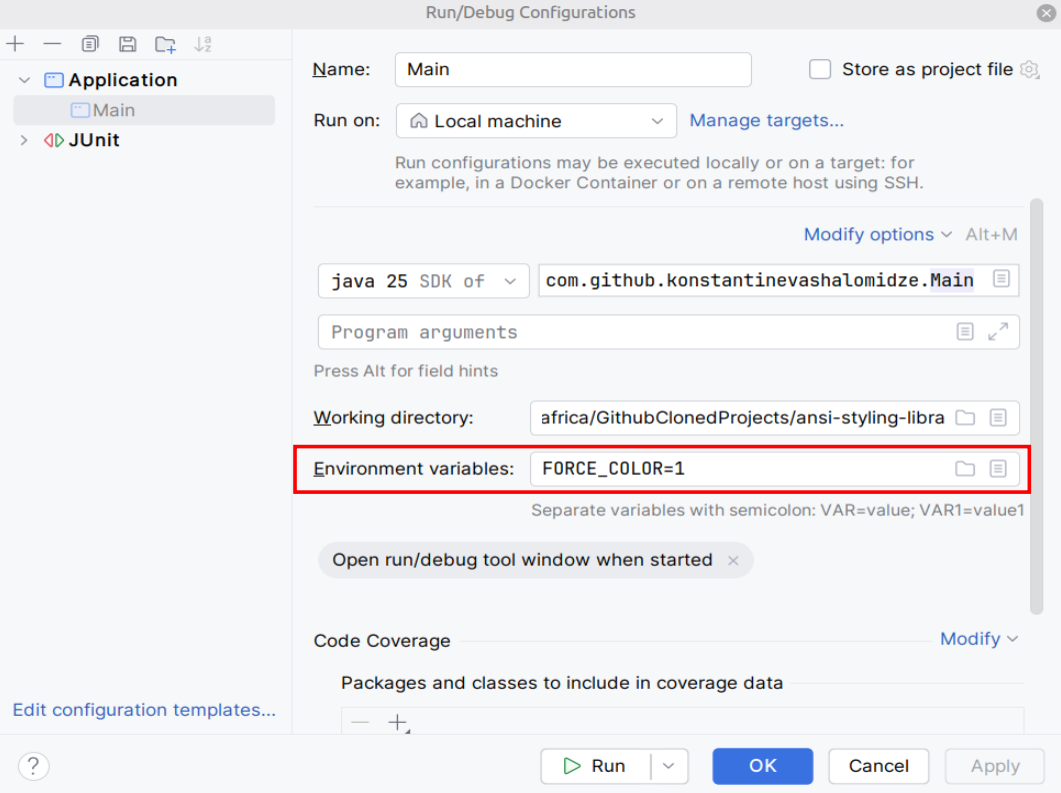
In a terminal it prints a console object. When piped, it prints null. Inside IntelliJ it also prints null, even though IntelliJ can display colors just fine. So relying only on System.console() would turn off color for everyone testing inside an IDE. That is the reason FORCE_COLOR exists in this library, and it is also the first note in the README.
Step Five: Boxes and Invisible Characters
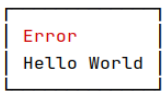
I also wanted to draw a border around text:
┌─────────────┐
│ Hi          │
│ Hello World │
└─────────────┘
To draw the border, the library has to know how wide each line is on screen. The trouble is that escape codes count as characters in a Java string, but they take no space on screen. "\033[31mHello\033[0m".length() is 14, yet only 5 characters appear. If you use length() to size the box, it comes out far too wide. The fix is to strip the escape codes with a regex and count what is left:
private static final Pattern PATTERN = Pattern.compile("\033\\[\\d+(;\\d+)*m");

static int visibleLength(String text) {
    return PATTERN.matcher(text).replaceAll("").length();
}
Compiling the pattern once as a constant matters, because the same regex runs on every call.
The same mistake was hiding in a second place. The box is as wide as its longest line, and I found that line with Comparator.comparing(String::length). Take two lines, a red A and the plain word Hi. On screen the red A is 1 character wide and Hi is 2, so Hi is the longest. But the red A is 10 characters long as a string, because of its escape codes, so length() picked it as the longest line and the box came out 8 columns too wide. The fix was one line: compare by visibleLength instead.
The lesson is that once a string can contain invisible characters, every place that measures it has to be checked, not just the first one you notice.
Step Six: Tests Actually Catch Real Bugs
I want to be honest here. My apply method checked NO_COLOR first and returned early, and only after that checked whether the input already contained escape codes. So with NO_COLOR set, the nesting check was silently skipped and bad input slipped through. I did not notice it by running the code, I noticed it when I traced the order of the checks. Swapping two lines fixed it, and a test now pins it:
@Test
void applyThrowsWhenContainsAnsiEscapeCodeEvenIfColorIsDisabled() {
    AnsiText ansiText = new AnsiText();

    assertThrows(AnsiException.class, () -> {
        ansiText.apply("\033[1mHi\033[0m", true);
    });
}
That test brings up another problem. The output of apply depends on environment variables and on System.console(), and Java cannot change environment variables from inside a test. The same test would pass in a terminal and fail inside an IDE, even though the code is correct.
My first idea was to mock the static method with Mockito, a library that replaces real methods with fake ones in tests. But that felt like a heavy tool for a small problem. Instead, I added a second version of apply that takes the color decision as a parameter. The public version just calls it with the real check. I made the second version package private, so tests in the same package can use it, but users of the library never see it. No mocking needed, and the public API stays clean.
What I Would Tell Someone Starting This Project
Do not start with colors or the fluent API. Start by running printf in a terminal and watching what the escape codes really do, including the ones that go wrong. Everything that surprised me in this project, the global reset, the null console, the invisible characters, I only understood after seeing it in a real terminal.
Then build the boring part first: one style, one code, one reset. Get that right, and everything more interesting builds on top of it.
Full source, tests, and the README with usage examples live here: github.com/KonstantineVashalomidze/ansi-styling-library